
Network Proxy Advanced Features
The Network Proxy Modifier lets you intercept live HTTP/HTTPS traffic during an Android manual session and change how it behaves, without touching your app's code or rebuilding it. This page covers its three advanced actions — Rewrite, Map Local, and Network Breakpoints — with the JSON rule shape and a working example for each.
Prerequisites
- An Android manual session with proxy enabled on the device.
- The app's traffic runs through the proxy, so any endpoint your app calls can be matched by a rule.
Opening the Modifier
- Start an Android manual session with proxy enabled.
- Open the Network Log tool in the session.
- Click Modifier to open the rule editor, or Breakpoints to view/manage paused traffic.
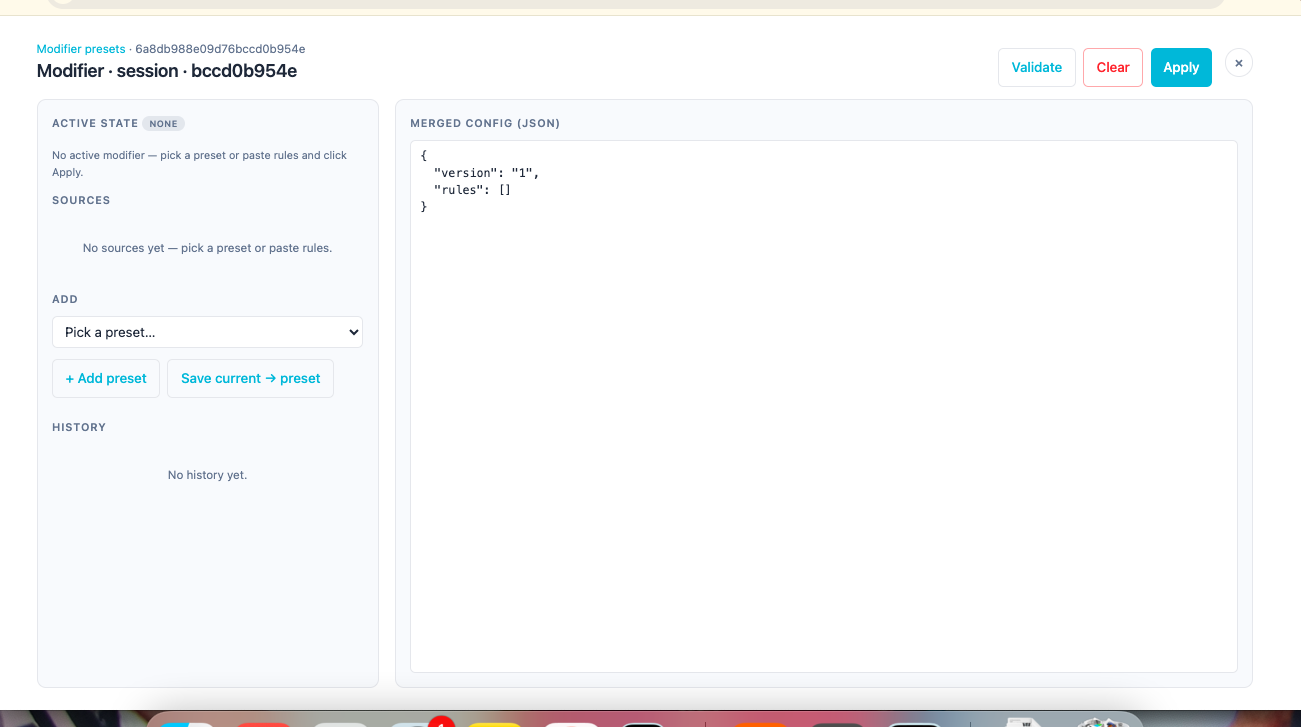
The Modifier page has two panels: pick or paste rules on the left, and see the merged JSON that will be applied on the right. Click Validate to check your rules before applying, Apply to activate them for the rest of the session, or Clear to remove them.
Both pages work off the same rule set for the session — a rule with a breakpoint action shows up as a paused flow on the Breakpoints page when it fires.
How a rule is structured
Every rule is a JSON object with a match condition and an action:
{
  "id": "force-checkout-500",
  "name": "Force checkout to fail with 500",
  "enabled": true,
  "priority": 100,
  "match": { "method": "POST", "host": "api.example.com", "path": "/v1/checkout" },
  "side": "response",
  "action": { "type": "rewrite", "rewrite": { "...": "..." } }
}
match— which requests the rule applies to.method,host, andpathare all optional; omit a field to match any value.side— whether the rule acts on the outgoingrequestor the incomingresponse.priority— when more than one rule matches the same traffic, higher priority runs first.enabled— toggle a rule off without deleting it.
A full rule set is a rules array under a version key:
{
  "version": "1",
  "rules": [ /* one or more rules */ ]
}
Paste a rule set like this into the Modifier and click Apply to activate it for the rest of the session.
Rewrite
Changes the status code, headers, or body of a matched request or response before it reaches its destination — the app (for a response) or the server (for a request).
Example — force a 500 on checkout with a custom error body:
{
  "version": "1",
  "rules": [
    {
      "id": "force-checkout-500",
      "name": "Force checkout to fail with 500",
      "enabled": true,
      "priority": 100,
      "match": { "method": "POST", "host": "api.example.com", "path": "/v1/checkout" },
      "side": "response",
      "action": {
        "type": "rewrite",
        "rewrite": {
          "status": 500,
          "headers": [
            { "op": "set", "name": "content-type", "value": "application/json" }
          ],
          "body": { "op": "replace", "raw": "eyJlcnJvciI6ICJQYXltZW50IHNlcnZpY2UgdW5hdmFpbGFibGUifQ==" }
        }
      }
    }
  ]
}
body.raw is base64-encoded — the value above decodes to {"error": "Payment service unavailable"}. Any base64 encoder (or echo -n '...' | base64) will produce this from your own JSON.
Example — change one field in a real response, without replacing the whole body:
{
  "id": "set-user-tier-premium",
  "name": "Set user tier to premium",
  "enabled": true,
  "priority": 100,
  "match": { "method": "GET", "host": "api.example.com", "path": "/v1/user/profile" },
  "side": "response",
  "action": {
    "type": "rewrite",
    "rewrite": {
      "body": {
        "op": "patchJson",
        "patches": [
          { "op": "replace", "path": "/user/tier", "value": "premium" }
        ]
      }
    }
  }
}
patches follows JSON Patch syntax — useful when you only need to tweak one or two fields in an otherwise-real server response, rather than replacing the whole body.
Map Local
Skips the real server entirely for a matched request and returns a response you've configured locally — useful for testing against data the real backend can't currently produce (a new feature flag, an edge-case payload, a still-in-development API).
Example — serve a canned response for a config endpoint:
{
  "version": "1",
  "rules": [
    {
      "id": "fake-config-response",
      "name": "Serve a canned /config response",
      "enabled": true,
      "priority": 100,
      "match": { "method": "GET", "host": "api.example.com", "path": "/v1/config" },
      "side": "request",
      "action": {
        "type": "mapLocal",
        "mapLocal": {
          "source": "inline",
          "inline": "{\"featureFlags\": {\"newCheckout\": true}}",
          "headers": [
            { "op": "set", "name": "content-type", "value": "application/json" }
          ],
          "status": 200
        }
      }
    }
  ]
}
Note: Map Local is exclusive — if a Map Local rule matches a request, no Rewrite rule runs afterward on that side. Match a Map Local rule and a Rewrite rule to the same traffic and only Map Local takes effect.
Network Breakpoints
Pauses a matched request or response mid-flight so you can inspect and, if you choose, edit it before it continues — for manual, live exploration rather than a pre-scripted change.
Example — pause every checkout response for inspection:
{
  "version": "1",
  "rules": [
    {
      "id": "pause-checkout-response",
      "name": "Pause every checkout response for inspection",
      "enabled": true,
      "priority": 100,
      "match": { "host": "api.example.com", "path": "/v1/checkout" },
      "side": "response",
      "action": {
        "type": "breakpoint",
        "breakpoint": {
          "phase": "response",
          "timeoutMs": 300000,
          "onTimeout": "passthrough"
        }
      }
    }
  ]
}
Once this rule is active and matching traffic occurs, the flow appears on the Breakpoints page as paused. From there you can:
- Inspect the decoded request/response.
- Edit the body or headers and click Continue with edits.
- Click Continue to release it unchanged, or Drop to discard it entirely.
phase can be request, response, or both (pause it twice — once on the way out, once on the way back). timeoutMs and onTimeout protect you from a forgotten breakpoint stalling the app indefinitely: if nobody responds within timeoutMs, RobusTest either lets the flow passthrough unmodified or drops it, depending on what you set.
Reusable presets
Instead of re-pasting a rule set every session, save it as a named preset from the Presets library:
- Open Presets and click + New.
- Paste your rule set JSON and give it a name.
- Save.
On future sessions, pick the preset from the Modifier's dropdown and click Apply instead of writing the JSON again.
Related Documentation
- Manual Session — where the Network Proxy Modifier fits into the overall Android manual session toolset
- Network Log — how to capture and inspect traffic without modifying it